


BLOG

Get the latest information about ULTIMEA.
Blog Tags
3D sound(1) 5.1.2 vs 7.1.4(1) Apollo P40(1) audio tips(1) AUX vs Optical audio quality(1) beginner guide(1) best home projector(1) Best way to connect AV receiver(1) Bluetooth(1) Bluetooth 5.0(1) Bluetooth 5.3(1) Bluetooth 5.4(1) Bluetooth speaker pairing(1) CEC feature explained(1) CEC for beginners(1) CEC setup guide(1) ceiling reflection(1) connectivity(1) DLP(1) Dolby Atmos(3) Dolby Atmos HDMI connection guide(1) eight channels(1) HDMI ARC(1) HDMI ARC Dolby Digital setup(1) HDMI CEC(1) HDMI device control(1) HDMI eARC(1) home audio(1) home audio upgrade(1) Home theater audio setup guide(1) home theater guide(1) home theater tips(1) How to connect soundbar to TV(1) How to use CEC(1) laser projector(1) LE Audio(1) Lossless audio HDMI vs Optical(1) movie night(1) Multi-channel audio connection guide(1) one remote control(1) Optical cable home theater setup(1) outdoor movie setup(1) party speakers(1) portable projector(1) portable speakers(1) Poseidon E100(1) projector technology(1) Skywave Series(1) Skywave X40(1) Skywave X70(1) smart home(1) sound quality(1) sound quality improvement(1) soundbar buying guide(1) soundbar guide(1) soundbar power(1) soundbar tips(1) soundbar watts(1) stereo sound system(1) subwoofer placement(1) surround sound comparison(1) Surround sound connection tips(1) TV and soundbar sync(1) TV audio control(1) TV audio settings(1) TV to soundbar connection methods(1) TWS speakers(1) Ultimea(1) Ultimea Go Jerry Can(1) Ultimea Skywave X(1) up-firing speakers(1) What is CEC(1) wireless stereo(1) wireless surround system(1)

What Is a TWS Speaker? How to Connect Two Bluetooth Speakers for True Stereo Sound

What Is a TWS Speaker? How to Connect Two Bluetooth Speakers for True Stereo Sound
Have you ever noticed that sometimes music just sounds “loud,” while other times it feels like you’re right there inside the performance? The difference often comes down to stereo sound.
With TWS (True Wireless Stereo) technology, you can easily pair two Bluetooth speakers together and enjoy real stereo sound—no complicated setup needed. Let’s dive into what TWS is, how it works, and how to connect two speakers to get that fuller, more immersive sound.

What Is TWS in Wireless Speakers?

TWS stands for True Wireless Stereo. Its main function is simple: when you pair two TWS-enabled speakers, one takes the left channel, the other takes the right channel. This separation creates a true stereo effect, just like a traditional sound system.
Compared to using just one speaker, TWS gives you:
  • Left and right channel separation: vocals, instruments, and effects sound more natural.
  • A wider soundstage: the sound spreads across a bigger area, not just one spot.
  • A more immersive experience: whether it’s games, movies, or music, everything feels more alive.

How to Pair Two Bluetooth Speakers with TWS

The exact steps may vary by brand, but the process is usually straightforward:
  1. Prepare two of the same model speakers (using the same brand and model is best for smooth pairing).
  2. Turn them on and make sure both are in Bluetooth pairing mode.
  3. Press the TWS pairing button (sometimes it’s the play button, other times a dedicated TWS button—check the manual).
  4. Once paired, one speaker will automatically become the “main” unit and the other the “secondary.”
  5. Connect your phone or computer to the main speaker via Bluetooth, and both will play together in stereo.
If it doesn’t work right away, try:
  • Placing the speakers closer together (within 1 meter).
  • Resetting and re-pairing.
  • Updating the firmware.

Example: Ultimea Go Jerry Can 360° Party Speaker with TWS

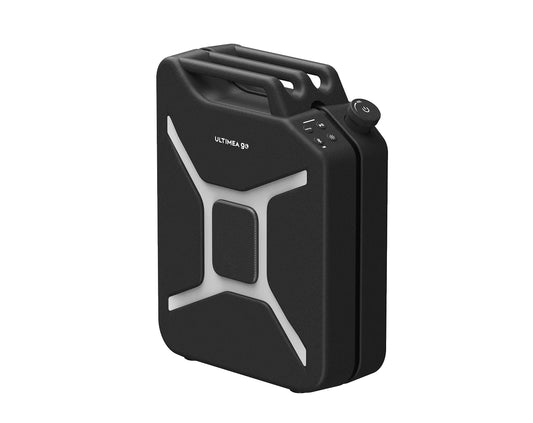
The Ultimea Go Jerry Can 360° Party Speaker comes with built-in TWS support. Even with just one unit, its 360° omnidirectional sound can fill an entire space with music.
But when you use two speakers together, you unlock true stereo sound:
  • Outdoor camping: place one on each side of your canopy and enjoy music that sets the perfect relaxed vibe.
  • Outdoor movie nights: put a speaker on each side of the screen, and suddenly the footsteps, dialogue, and soundtrack feel like you’re in a mini open-air cinema.
  • Friends’ gatherings: pair them with a single tap, and the party instantly feels bigger, brighter, and more exciting.
With TWS, it’s not just about being louder—it’s about richer layers of sound that feel real and engaging.

Final Thoughts on TWS Bluetooth Speakers

The beauty of TWS is that it turns two wireless speakers into a complete stereo system. With the right pairing, you can enjoy a professional sound experience at home, outdoors, or anywhere you like.
If you’re looking for a portable speaker, the Ultimea Go Jerry Can 360° Party Speaker is a great choice. One unit brings the party to life, and two together give you a true stereo setup for both music and movies.
 

Related Products
Blog Tags
3D sound(1) 5.1.2 vs 7.1.4(1) Apollo P40(1) audio tips(1) AUX vs Optical audio quality(1) beginner guide(1) best home projector(1) Best way to connect AV receiver(1) Bluetooth(1) Bluetooth 5.0(1) Bluetooth 5.3(1) Bluetooth 5.4(1) Bluetooth speaker pairing(1) CEC feature explained(1) CEC for beginners(1) CEC setup guide(1) ceiling reflection(1) connectivity(1) DLP(1) Dolby Atmos(3) Dolby Atmos HDMI connection guide(1) eight channels(1) HDMI ARC(1) HDMI ARC Dolby Digital setup(1) HDMI CEC(1) HDMI device control(1) HDMI eARC(1) home audio(1) home audio upgrade(1) Home theater audio setup guide(1) home theater guide(1) home theater tips(1) How to connect soundbar to TV(1) How to use CEC(1) laser projector(1) LE Audio(1) Lossless audio HDMI vs Optical(1) movie night(1) Multi-channel audio connection guide(1) one remote control(1) Optical cable home theater setup(1) outdoor movie setup(1) party speakers(1) portable projector(1) portable speakers(1) Poseidon E100(1) projector technology(1) Skywave Series(1) Skywave X40(1) Skywave X70(1) smart home(1) sound quality(1) sound quality improvement(1) soundbar buying guide(1) soundbar guide(1) soundbar power(1) soundbar tips(1) soundbar watts(1) stereo sound system(1) subwoofer placement(1) surround sound comparison(1) Surround sound connection tips(1) TV and soundbar sync(1) TV audio control(1) TV audio settings(1) TV to soundbar connection methods(1) TWS speakers(1) Ultimea(1) Ultimea Go Jerry Can(1) Ultimea Skywave X(1) up-firing speakers(1) What is CEC(1) wireless stereo(1) wireless surround system(1)
Recent News
Want Great Sound? Don’t Ignore These 5 Setup Details

Want Great Sound? Don’t Ignore These 5 Setup De...

By Liz Wu

Getting a new soundbar is exciting — but great sound doesn’t just come from the hardware. The real difference comes from how you set it up. Even a powerful system can...

Read More

Want Great Sound? Don’t Ignore These 5 Setup De...

By Liz Wu

Getting a new soundbar is exciting — but great sound doesn’t just come from the hardware. The real difference comes from how you set it up. Even a powerful system can...

Read More
Modern living room home theater setup with a soundbar under the TV, showcasing a spacious environment ideal for comparing 5.1.2 and 7.1.4 surround sound systems

5.1.2 vs 7.1.4: What’s the Difference? How to U...

By Liz Wu

Introduction If you have been looking into home theater systems or soundbars recently, you might have come across numbers like 5.1.2 and 7.1.4. At first glance, they can look confusing...

Read More

5.1.2 vs 7.1.4: What’s the Difference? How to U...

By Liz Wu

Introduction If you have been looking into home theater systems or soundbars recently, you might have come across numbers like 5.1.2 and 7.1.4. At first glance, they can look confusing...

Read More
Social Media

Napište komentář

Upozorňujeme, že komentáře musí být před zveřejněním schváleny.